


A practical map for tracing one browser request through AWS, understanding the controls around it, and finding the layer that actually failed.
A web server can be running perfectly and still be unreachable.
That is the first lesson hidden inside many AWS labs. You can install httpd, start the service, open port 80 in a security group, paste a public IP address into a browser, and see nothing. The natural reaction is to keep changing settings until the page appears.
That is how beginners lose hours.
The more useful habit is to stop seeing AWS networking as a pile of settings. Treat it as a path. A browser request has to make it through a series of decisions before an Amazon Linux web server can answer it. Each decision has a different job. Each can fail for a different reason. And each leaves a different clue.
This guide is the map I wish every early cloud learner had before touching an EC2 networking lab.
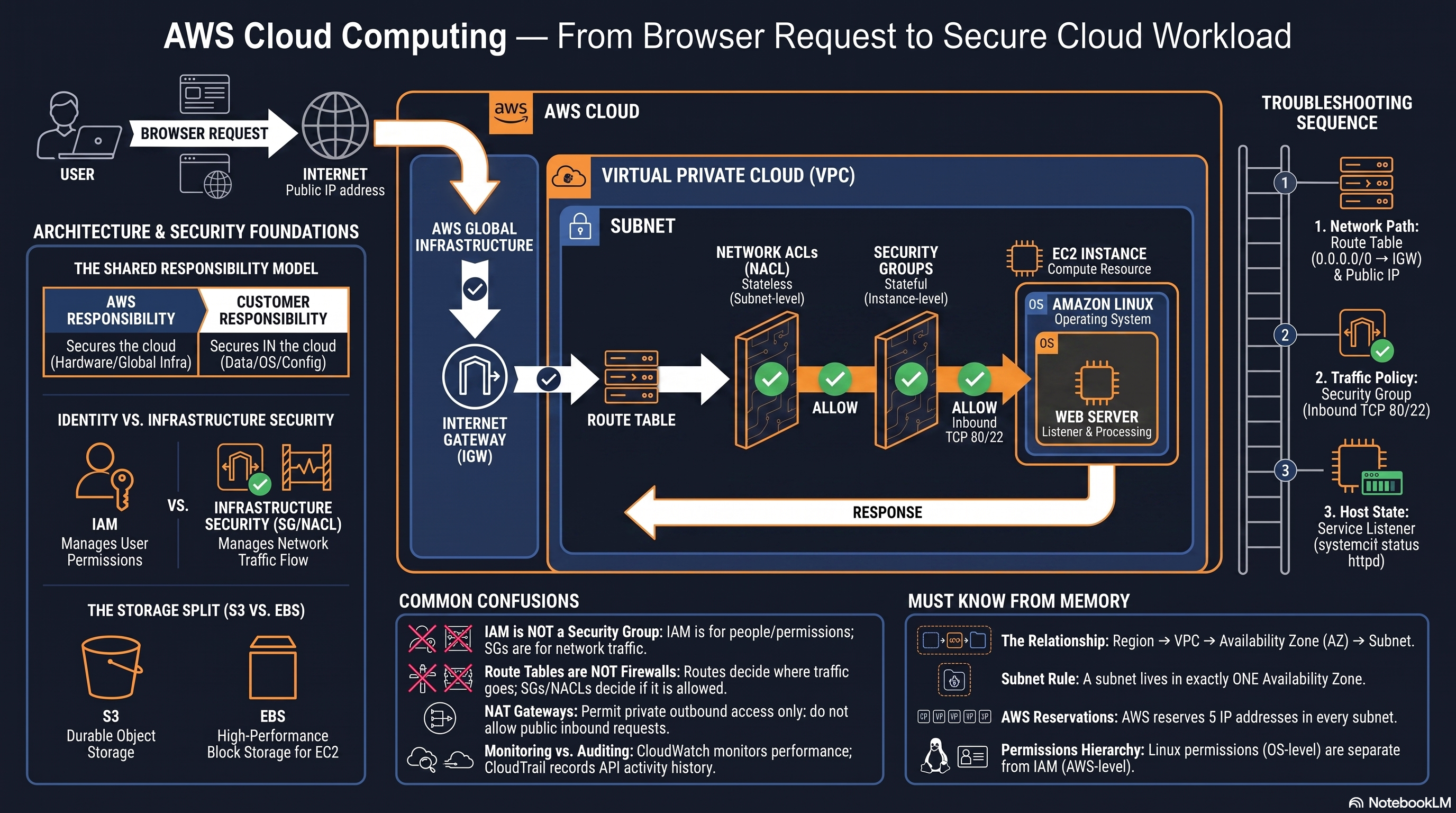
The diagram: an orientation layer, not a literal packet trace
The supplied AWS map is the visual anchor for this guide. Read the centre from left to right, then use the side panels as a troubleshooting index. The written guide expands the parts that must not be learned as icons alone.
The diagram is valuable because it puts the major questions in one frame: where traffic is trying to go, which layer can reject it, and whether the operating system is actually ready to answer. It is deliberately simplified, though. Treat the orange elements as decision layers, not as a set of physical boxes every packet literally visits in that screen order.
Four caveats keep the picture technically useful:
A public production endpoint often includes DNS, a CDN, AWS WAF, and an Application or Network Load Balancer before traffic reaches a workload. The diagram uses direct public EC2 access because it is the smallest useful learning topology.
A route table is not a firewall gate. It selects the next hop for a destination; it does not allow TCP port 80.
A subnet is public because its route table has a path to an Internet Gateway. A public IPv4 address on the instance is also required for direct IPv4 internet communication, but an address alone does not make the subnet public.
The return journey matters. Security Groups are stateful, so a response to an allowed flow is permitted automatically. Custom Network ACLs are stateless, so their outbound rules must independently allow the response.
The small text inside the image should not carry the lesson by itself, especially on a phone. Use it as the map. Use the sections below as the explanation and the verification method.
First, picture the request as a journey
Imagine a browser requesting http://<public-ip>. The request does not jump from your laptop straight into httpd. For a public IPv4 EC2 workload, the useful mental model is:
Browser
  → Internet
  → Internet Gateway
  → Route table and public subnet
  → Network ACL
  → Security group
  → EC2 network interface
  → Amazon Linux
  → Web server listening on port 80
The reply has to make the return journey too.
That last sentence matters. A successful inbound request is not the same as a successful connection. The server must be able to send a response, and the network controls on the return path must permit it.
The five pillars below turn that one line into a working AWS model.
Pillar 1: The request journey is a sequence of jobs
Step zero: distinguish name resolution from the network path
The diagram begins at “Browser Request.” In a real web visit, the browser normally resolves a DNS name before it can open a TCP connection. If DNS returns the wrong record, has not propagated, or points at an old load balancer, the later VPC layers may be perfectly healthy and the browser will still fail to reach the intended workload.
That is why a useful first split is:
| Symptom | First question | | --- | --- | | The hostname does not resolve | Is DNS returning the intended record? | | The hostname resolves but the connection times out | Does a network path and policy permit the connection? | | The TCP connection opens but HTTP returns an error | Is the listener, reverse proxy, or application healthy? |
Using http://<public-ip> in an early lab intentionally removes DNS from the first exercise. That does not make DNS unimportant; it lets you learn the VPC path without mixing two different problem classes.
1. The Internet Gateway is the VPC’s internet edge
An Internet Gateway, or IGW, attaches to a VPC. It is not a firewall rule and it is not an IP address. It is the VPC component that makes a route to the public internet possible.
For IPv4, an EC2 instance also needs a public IPv4 address or an Elastic IP, plus a route from its subnet to the IGW. AWS documents that the instance itself is aware of its private address inside the VPC; the IGW performs the logical one-to-one network address translation between the instance’s private IPv4 address and its public address.
That gives us a practical definition of a public subnet:
A subnet is public when its associated route table has a direct route to an Internet Gateway.
A private subnet is not “a subnet with no public IP by definition.” Its important property is that it does not have a direct route to an IGW. A private workload may need outbound internet access for updates or package downloads, but it should use a NAT device for that outbound path rather than accept unsolicited inbound connections from the internet.
2. The route table is a map, not a gate
A route table answers a direction question:
“Where should traffic for this destination go next?”
For a basic public IPv4 subnet, the familiar default route is:
Destination: 0.0.0.0/0
Target:      igw-...
This does not mean “allow all traffic.” It means traffic with a destination not covered by a more specific route should be sent toward the Internet Gateway. The firewall-like decisions come later.
This distinction removes one of the most common AWS confusions. A route table can make a destination reachable in principle. It cannot open TCP port 80. It cannot decide whether a user may call DescribeInstances. It cannot prove that httpd is alive.
Which route table actually applies?
A VPC has a main route table, but a subnet can be explicitly associated with another route table. When a connection fails, looking at a route table that exists somewhere in the VPC is not enough. Verify the association for the subnet that contains the workload’s network interface.
Then verify route selection. AWS uses the most specific matching route, often called the longest prefix match. A route for 10.0.0.0/16 is more specific than 0.0.0.0/0, so traffic for an internal 10.0.x.x address follows the internal route rather than the internet default route. That is normal and desirable.
For a browser reaching a public IPv4 address, the simplified public-subnet requirement is still familiar:
Destination: 0.0.0.0/0
Target:      Internet Gateway
But the real troubleshooting question is more precise: does the workload’s subnet have the intended associated route table, and does that table choose the intended next hop for this destination?
Do not confuse public addressing with public architecture
A direct public IPv4 EC2 instance is a good learning lab because every layer is visible. It is rarely the final shape of a production web tier. A more typical public path is browser, DNS, optional CDN/WAF, load balancer, then private application targets. The important mental model survives the topology change: every hop still needs a route, a policy decision, and a healthy receiver. What changes is the number of hops and the security-group relationships between them.
3. The subnet is the local network boundary
A VPC contains subnets. Every subnet lives entirely inside exactly one Availability Zone. It cannot span Availability Zones.
The useful hierarchy to remember is:
Region
  VPC
    Availability Zone
      Subnet
        Network interface / EC2 instance
That is a location model, not a security stack. It tells you where the workload’s network interface lives. The route table, NACL, and security group decide how that interface may communicate.
4. The final application must be ready
Even a correct VPC configuration cannot make a stopped service respond.
For an Amazon Linux Apache lab, the host-level checks are simple:
sudo systemctl status httpd
sudo ss -tlnp | grep ':80'
curl -I http://localhost
These commands answer different questions:
Is the service process healthy?
Is anything listening on TCP port 80?
Can the local machine receive an HTTP response without involving the network path?
If curl -I http://localhost fails, do not start by rewriting a security group. The problem is on the host.
Pillar 2: AWS uses layered network security on purpose
The two controls beginners most often merge into one imaginary “AWS firewall” are Network ACLs and Security Groups. They overlap in the sense that both can affect traffic. They do not do the same job.
Network ACLs: the subnet-level policy
A Network ACL, or NACL, is associated with a subnet. It applies to traffic entering and leaving that subnet.
NACLs have several traits worth memorising:
| NACL property | Why it matters | | --- | --- | | Subnet-level | It can affect every workload in its associated subnet. | | Stateless | Inbound permission does not automatically create return-path permission. | | Allow and deny rules | You can explicitly block matching traffic. | | Ordered evaluation | AWS checks the lowest rule number first and stops at the first matching rule. |
A subnet must be associated with one NACL. If you do not explicitly associate a custom NACL, AWS associates the subnet with the default NACL.
Security Groups: the workload-level policy
A Security Group is associated with network interfaces used by an EC2 instance or other resource. For early learning, “instance-level firewall” is a useful simplification, but the precise mental model is interface-level policy.
Security Groups are:
| Security Group property | Why it matters | | --- | --- | | Stateful | Replies to allowed traffic are automatically allowed back. | | Allow-only | There are no deny rules. You allow the traffic you need and leave the rest unapproved. | | All rules evaluated | AWS evaluates the applicable rules rather than stopping at a first matching rule number. | | Composable | Multiple security groups can be associated with one resource. |
A simple web-server rule might allow inbound TCP port 80 from 0.0.0.0/0 for a deliberately public demonstration. That can be valid for a public web endpoint. It is not a good default for SSH. AWS explicitly recommends restricting SSH access on port 22 to the specific IP ranges that need it.
The NACL return-traffic trap
This is the detail that turns a diagram into operational knowledge.
A Security Group is stateful. If it allows an inbound HTTP request to your instance, it allows the matching response to leave even if you did not write a separate outbound reply rule.
A NACL is stateless. If its inbound rules allow a client’s HTTP request, its outbound rules still need to allow the response. A NACL does not remember that the inbound packet was permitted.
That means a broken connection can look like this:
The browser sends an HTTP request.
The route table directs traffic correctly.
The NACL inbound rule allows TCP port 80.
The Security Group allows TCP port 80.
httpdreceives the request and prepares a response.The outbound NACL rejects the return traffic because no matching outbound rule permits it.
The browser hangs or times out.
The lesson is not “always use a wide ephemeral-port range.” Exact ranges depend on the client and design. The lesson is: when you use a custom NACL, reason about both directions.
For many basic EC2 environments, Security Groups are the primary workload control. NACLs add a broader subnet boundary when that extra layer is actually useful. They are not automatically “more secure” just because they are another service to configure.
Why return traffic involves more than port 80
HTTP is an application protocol carried over TCP. A browser normally opens a connection from a temporary client-side source port to destination port 80 or 443. The server replies from port 80 or 443 back to that temporary client port.
That is why a custom NACL needs to be designed in both directions. An inbound rule that permits destination port 80 does not by itself describe the outbound response, whose destination is the client’s ephemeral source port. The exact ephemeral range depends on the client operating system and your architecture, so copying a random range from a tutorial is not a substitute for understanding the flow.
The practical sequence is:
Identify the initiator and the service port.
Identify the reply direction and the initiator’s temporary source port range.
Write and review NACL rules for both legs.
Test the full connection, not merely whether the inbound rule exists.
Security Group statefulness makes the normal response flow less manual, but it does not mean “all outbound traffic is automatically safe.” Outbound Security Group rules still control new flows initiated by the workload. A package manager downloading updates, an application calling a third-party API, and a server replying to an allowed browser connection are different cases.
Prefer intent-based Security Group relationships in multi-tier designs
CIDR rules are sometimes correct. A public load balancer may need to allow traffic from the internet. But inside a VPC, a Security Group can often reference another Security Group. For example, an application-tier Security Group can allow TCP 8080 from the load-balancer Security Group, rather than from a broad IP range.
That rule expresses architecture rather than a fragile address list: only interfaces carrying the load-balancer role may initiate that application flow. It is one reason production designs can be safer and easier to reason about than a single public EC2 instance, even though they contain more components.
Pillar 3: Identity, infrastructure, and responsibility are different layers
Cloud security becomes much clearer when you ask two separate questions.
Who is allowed to perform an AWS action?
What network traffic is allowed to reach a workload?
IAM answers the first question. Network controls answer the second.
IAM is about authority
AWS Identity and Access Management controls permissions to AWS APIs and resources. It can decide whether a principal may start an instance, view a bucket, create a security group, or read an object.
IAM does not listen on TCP port 22. It does not decide whether an incoming browser request can reach an EC2 network interface.
Network controls are about reachability
Route tables, NACLs, Security Groups, public IP configuration, and host firewalls decide whether traffic can take a path to the workload and whether it may cross the relevant policy boundaries.
A useful distinction:
| Question | Primary control family | | --- | --- | | Can this user create or stop an EC2 instance? | IAM | | Can this IP address connect to TCP 22? | Security Group, possibly NACL, then host firewall | | Can internet-bound traffic leave this subnet? | Route table and IGW or NAT design | | Is Apache actively answering on port 80? | Operating system and application |
Shared responsibility is a working boundary, not a slogan
AWS describes its model as security of the cloud and security in the cloud.
AWS is responsible for the physical infrastructure and the services it provides. The customer’s responsibility depends on the service and its configuration. With an EC2 workload, you still own important decisions: IAM permissions, network configuration, operating-system patching, application configuration, data handling, and who can reach the server.
The useful mindset is not “AWS will secure it” or “I must secure everything.” It is:
AWS secures the underlying cloud. I must understand and operate the parts I configure inside it.
That mindset naturally leads to verification. A rule exists. Is it attached to the right interface? A route exists. Is the subnet actually associated with that route table? The service is installed. Is it running and listening?
Pillar 4: The anti-confusion map
A fast way to learn AWS is to stop asking what a service is called and start asking what job it performs.
Route table vs firewall
Route table: chooses a next hop for a destination.
Firewall-like policy: permits or rejects traffic.
A route can be correct while the Security Group blocks the connection. A Security Group can allow port 80 while no route leads from the internet to the subnet.
Internet Gateway vs NAT Gateway
Internet Gateway: enables direct internet connectivity for workloads in a public subnet when routing and public addressing are configured.
NAT Gateway: gives workloads in a private subnet a way to initiate outbound IPv4 connections without making them directly reachable for unsolicited inbound internet connections.
A NAT Gateway is not an inbound door for a private web server.
CloudWatch vs CloudTrail
Amazon CloudWatch: operational visibility. Think metrics, logs, alarms, and the question “is the system healthy or behaving as expected?”
AWS CloudTrail: API activity and audit history. Think “who called what API, when, and from where?”
They can work together, but they answer different questions. Monitoring an unhealthy server is not the same as auditing a configuration change.
S3 vs EBS
Amazon S3: object storage. You work with objects in buckets through APIs and URLs.
Amazon EBS: durable block storage attached to EC2, used like a disk device after attachment and filesystem setup.
EBS is appropriate for an EC2 system disk, databases, and frequently updated block storage. EBS volumes persist independently of the running life of the instance and must be in the same Availability Zone as the EC2 instance they attach to.
S3 is not “an EBS drive in the cloud.” It is a different storage model with different access patterns, durability design, and operational responsibilities.
Linux permissions vs IAM permissions
IAM can grant permission to call AWS APIs. Linux file permissions determine whether a local process or user on the instance can read, write, or execute a file.
They are separate systems. Giving an IAM role S3 permissions does not make a local file readable by every Linux user. Changing chmod does not grant an IAM principal access to a bucket.
Pillar 5: Infrastructure literacy is the ability to debug a path
The point of memorising AWS terms is not to pass a vocabulary test. It is to make the next failure smaller.
When a public EC2 web server is unreachable, use this order.
Step 1: Test the network path
Ask whether a path exists at all.
Is the IGW attached to the VPC?
Is the instance subnet associated with a route table that points the intended internet-bound traffic to the IGW?
Does the instance have a public IPv4 address or Elastic IP for IPv4 internet communication?
Is the instance in the intended subnet and VPC?
Do not change a Security Group until the path itself is plausible.
Step 2: Test the traffic policy
Now ask which policy may be rejecting the packet.
Does the subnet’s NACL allow the inbound traffic?
Does its outbound NACL allow the response?
Does the Security Group allow the inbound protocol, port, and source?
Is there an operating-system firewall rule that blocks the service locally?
For an HTTP demo, be precise: protocol TCP, destination port 80, and the right source range.
Step 3: Test the host state
Only after network path and policy make sense should you troubleshoot the machine.
sudo systemctl status httpd
sudo systemctl enable httpd
sudo ss -tlnp | grep ':80'
curl -I http://localhost
If the local test works but the public request fails, move back outward one layer. If the local test fails, fix the service before touching the VPC.
Step 4: Gather evidence instead of reopening every rule
A good troubleshooting loop replaces guesses with evidence. AWS gives you different evidence sources because the layers are different:
| Question | Evidence source | What it can tell you | | --- | --- | --- | | Did a control-plane change happen? | CloudTrail | Which identity called an AWS API, such as an EC2, VPC, or IAM API, and when. | | Is the workload healthy over time? | CloudWatch metrics, logs, and alarms | CPU, instance/application logs, health signals, and operational trends. | | Did IP traffic reach an ENI, subnet, or VPC boundary and get accepted or rejected? | VPC Flow Logs | Source/destination addresses, ports, protocol, action, and the relevant network interface context. | | Is the local listener or application failing? | System logs and host commands | Whether the service is running, listening, and returning a local response. |
VPC Flow Logs are especially useful once the topology contains more than one tier. They record IP traffic metadata for a network interface, subnet, or VPC. They do not replace application logs and they do not automatically explain every possible application failure, but an ACCEPT or REJECT record can narrow the network question dramatically.
For example, a rejected flow involving the expected ENI, source address, destination port, and protocol suggests the request is being stopped before the application can answer. An accepted flow does not prove the website is healthy; it tells you the flow was not rejected at the logged network layer. Continue inward to the listener and application response.
The request-trace worksheet
For any failed connection, write down a compact trace rather than mentally juggling settings:
| Layer | What you record | Healthy signal | Typical failure | | --- | --- | --- | --- | | Name | DNS name and returned address | Correct target resolves | Stale, absent, or wrong record | | Addressing | Public IP/EIP or private target | Address matches intended topology | No public address for direct IPv4 path | | Route | Subnet, associated route table, matching next hop | Intended route selected | Wrong association or no viable next hop | | Subnet policy | NACL inbound and outbound rules | Both legs permitted | Return flow blocked by stateless policy | | Interface policy | Attached Security Groups and exact rule | Correct source, protocol, and port allowed | Missing/too-narrow inbound rule | | Host | Listener, local firewall, service logs | Local curl succeeds | Service stopped, wrong bind address, app error | | Application | HTTP status and access/error logs | Expected response code | Reverse proxy, virtual host, or application failure |
This is the operational version of the diagram. Instead of saying “networking is broken,” you can say which layer has evidence, which layer has not been verified, and which test should happen next.
A small addressing fact that prevents subnet mistakes
AWS reserves five IPv4 addresses in every subnet: the first four and the last address. In 10.0.0.0/24, that includes the network address, the VPC router address, the DNS-related reserved address, one address reserved for future use, and the final address.
That is why a /24 does not give you 256 assignable EC2 addresses.
The practice that turns this into skill
Take one disposable EC2 web-server lab and trace the request on paper before changing anything.
Write the instance’s subnet and Availability Zone.
Find the route table associated with that subnet.
Identify the route that makes it public or private.
Record the NACL associated with the subnet and inspect inbound and outbound rules.
Record the Security Group attached to the instance network interface.
Verify the listener locally with
curl -I http://localhost.Make one safe change at a time, then test again.
The outcome you want is not simply a working browser page. It is the ability to explain why it works.
Once that explanation is clear, AWS stops being a console full of magical checkboxes. It becomes an environment where each layer has a job, each failure has a location, and each fix can be verified.